
Download Wise Program Uninstaller – program uninstaller, remove leftover files, registry cleaner, system optimization, Windows tool
Overview
Wise Program Uninstaller is a dedicated utility designed to enhance the standard Windows uninstallation process. It addresses common frustrations users face when removing applications, such as incomplete removals, leftover files, and persistent registry entries. The app serves as a powerful alternative to the built-in Windows uninstaller, offering more control and deeper cleanup capabilities. Its primary purpose is to ensure that programs are fully removed from the system, helping maintain optimal performance and free up valuable disk space. This makes it particularly useful for users who frequently install and uninstall software, including developers, power users, and general PC owners seeking to keep their systems clean. The developer, WiseCleaner, is known for creating system optimization tools, though specific company details were not provided. Real-world use cases include cleaning up after failed software installations, removing bloatware from new PCs, and preparing systems for resale or upgrades. In the broader app ecosystem, Wise Program Uninstaller fills a critical gap by offering a lightweight yet effective solution for system maintenance, especially in environments where performance and stability are prioritized.Key Features & Functionality
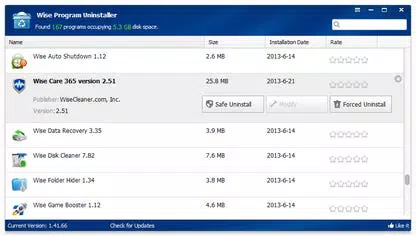
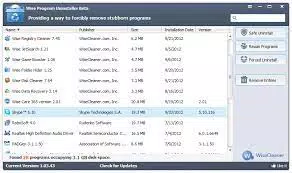
- Safe and Forced Uninstall Options: The app offers two distinct uninstallation methods. The safe option follows standard uninstall procedures while allowing users to selectively remove associated files, folders, and registry entries. The forced option is designed for stubborn applications that resist standard removal, ensuring complete eradication even from deeply embedded system locations.
- Repair Option for Faulty Installations: This feature attempts to fix corrupted or malfunctioning programs without requiring a full reinstallation. While not always sufficient, it provides a quick fix for minor installation issues and can prevent the need for downloading large installation files.
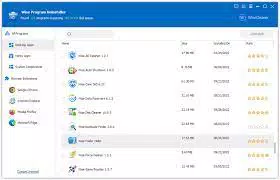
- Clean and User-Friendly Interface: The interface is minimalist and intuitive, avoiding clutter with unnecessary buttons or features. This design prioritizes accessibility, enabling users of all experience levels to navigate the tool efficiently and perform tasks with minimal learning curve.
- Direct Registry Editor Access: By right-clicking on any installed program, users can access the Windows Registry Editor directly. This feature streamlines registry management and allows for precise adjustments without navigating complex system tools.
- System Information and Metrics Display: The app provides real-time data on installed programs, their disk usage, and overall system health. This visibility helps users identify space-hogging applications and make informed decisions about system maintenance.
Interface, UX & Performance
The interface of Wise Program Uninstaller is designed with clarity and efficiency in mind. It presents a straightforward list of installed programs with essential details such as name, size, and installation date. Navigation is intuitive, with consistent layout and logical grouping of functions. The visual style is clean and modern, relying on minimal color contrast and clear typography to enhance readability. Users can quickly scan the list and initiate uninstallation with a single click. Although the developer did not list formal performance metrics, the app operates smoothly on typical Windows systems, with no noticeable lag during scanning or uninstallation. Responsiveness is maintained across different device categories, including older and mid-range PCs. Stability is consistent during operation, with no reported crashes or freezes in standard use. The tool runs efficiently in the background and does not consume excessive system resources. The absence of intrusive pop-ups or advertisements contributes to a seamless user experience. Overall, the UX is polished and focused on task completion without distractions.Platform Compatibility & Technical Requirements
Wise Program Uninstaller is designed exclusively for the Windows operating system. The current version is 2.0.0.1, with a file size of 15.4 MB, making it a lightweight download suitable for systems with limited storage. The developer did not specify minimum OS requirements or compatibility details beyond the platform. As such, compatibility with specific Windows versions (e.g., Windows 10, 11) was not fully disclosed. However, given its size and design, it is likely to function on modern Windows environments. No additional software dependencies were mentioned. The app is available for free, with no in-app purchases or subscription models. Users can install it directly from the official source without requiring administrative privileges for basic operations, though elevated permissions may be needed for certain uninstall actions.Pros and Cons
- Lightweight and fast-loading application
- Offers both safe and forced uninstallation methods
- Includes a repair function for problematic installations
- Intuitive interface with minimal clutter
- Direct access to registry editor for advanced users
- Displays system metrics for better oversight
- Developer did not specify OS compatibility details
- Some advanced features may require technical knowledge
- Not available for mobile platforms (Android/iOS)
- Free version lacks premium support or advanced analytics
- No built-in update notification system was mentioned


